In English code, we often like to combine multiple words when naming something in our code. This precision is sometimes necessary because naming is important, and hard! If you’re not convinced, read Tom Benner’s “Naming Things, The Hardest Problem in Software Engineering”. But, most programming languages don’t allow spaces in variable names, because lexers and tokenizers rely heavily on whitespace as a token boundary.
To get around this, some people like to use underscores or dashes. Another way is to exploit the English alphabet’s division into lower and upper case letters, a technique called “Camel Casing”:
coolVariableName = 1 # Camel CaseAnotherName = 2 # More Camel Casing, sometimes called Pascal Case like this.
“Ah, there’s the rub” you might be thinking, since you already know that Arabic doesn’t do upper and lower cases. Plus, Arabic’s cursive-looking letters are joined together in words, so a camelCasing attempt could end up looking like this:
احسنالإسم = 3
“Therefore, code in Arabic can’t use camelCase, the irony!” but, that would be wrong. We can, in fact do something similar to camel casing without having to work around it with underscores or dashes like we do here:
احسن-الإسم = 1 # hard to read, isn't it?احسن_الإسم = 2 # not bad, but looks mismatched.
We can do something like this instead and avoid any whitespace between the letters while not allowing them to combine as they normally would:
احسنالإسم = 1 # Oh, it's beautiful
How did you do that?
I just used an invisible Unicode character as a word boundary called the ZERO WIDTH NON-JOINER whose hex code is U+200C (you’ll need to remember that; it’ll be important later because, Computers…). It prevents two adjacent Arabic letters from being displayed as joined; they will remain separate even when Arabic orthography wants them to be joined. It’s called Zero width because it’s exactly that: it doesn’t show any space between the two letters either.
MacOS
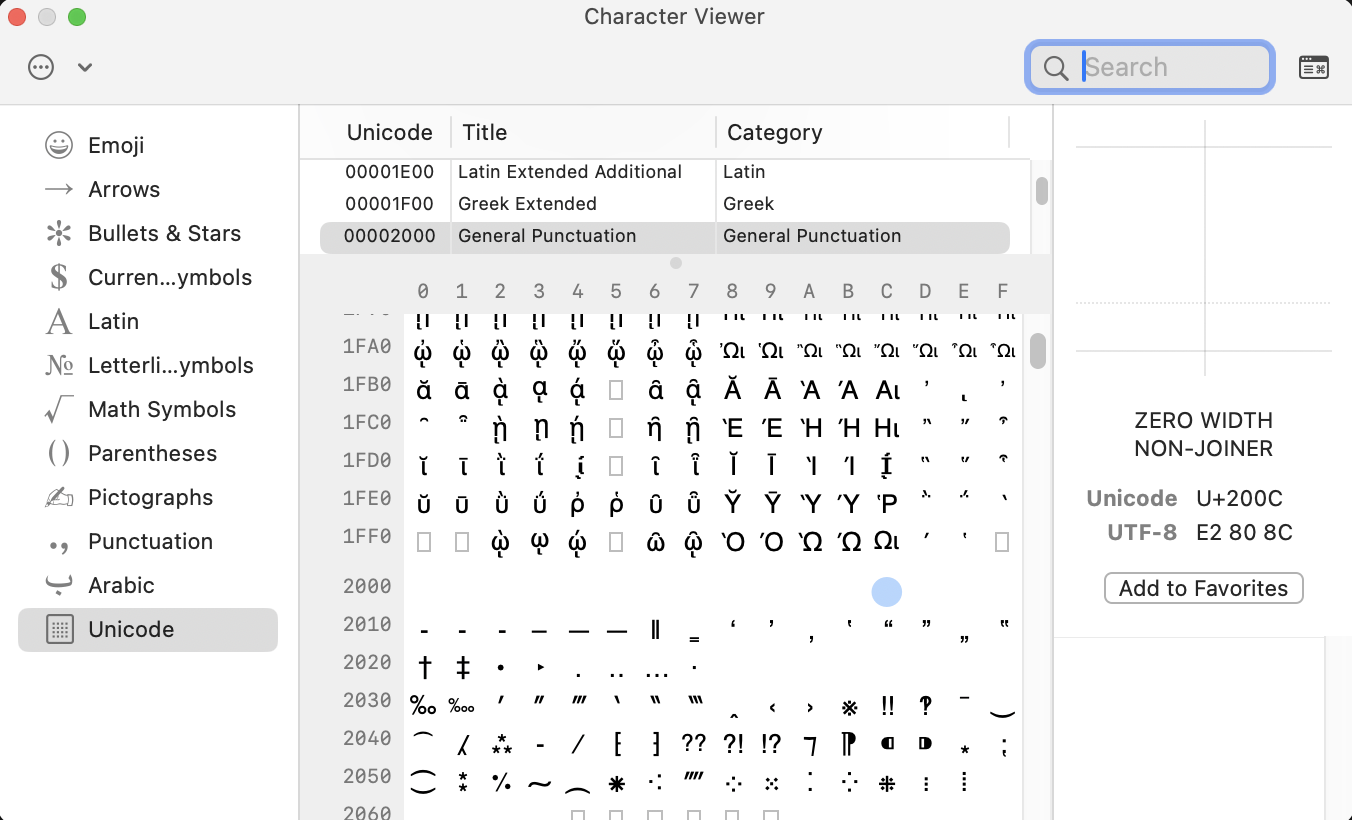
It turned out to be harder than I thought. A user will have to open the macOS’ “Character Viewer” and set it to show Unicode characters. It was hard to for me find it in macOS’ “Character Viewer” app; I couldn’t find the character ZWNJ nor by spelling it out. I had to navigate through the Unicode table, by finding row 2000 and then column C. I added it as a favorite…
Linux
It really depends on the distribution; one possibly universal method is to type in the hex code: Press Ctrl + Shift + U then type 200C and press Enter or the space bar. If you use a Linux distro in Arabic, tell me how you do it in the comments!
Windows
Apparently, if you’re using the Arabic Keyboard layout, you just need to type Shift + Space (I don’t have a Windows machine).
Does it work in ArabicBASIC?
Yes! The lexer preserves Unicode join controls by allowing ZWNJ in identifiers and considering it as part of the byte stream, even though it’s invisible to human eyes in code. Also, we don’t strip it for normalizing (NFKC). Here’s the relevant part of the ANTLR4 grammar:
fragment JOIN_CONTROL: [\u200C\u200D];IDENTIFIER: ARABIC_LETTER ( ARABIC_LETTER | ARABIC_MARK | JOIN_CONTROL // ← ZWNJ or ZWJ allowed mid-identifier | ID_DIGIT | '_' | '\u0640' )*;
As you can see, we also allow Snake Case with underscores, but the unfortunately named Kebab Case with dashes is not supported…should we?
Further Reading
Andreas Hallberg has a well-written article here about Unicode for Arabic texts: Unicode for Arabists.
For even more background on camel casing, see this lovingly long Wikipedia article: Camel Case.
For an esoteric side quest into a world where whitespace IS the code, see the Whitespace programming language. You have been warned.
Unicode TR #31 Identifiers and Syntax, which explicitly discusses ZWNJ and similar characters in identifiers (there’s more than one such char!).


Leave a Reply